Visual Differences
Identify differences between Figma designs and live pages.
- Design-to-website visual differences
- Element positioning differences
- Layout inconsistencies
- Missing or incorrectly rendered elements
Compare Figma designs with live websites to detect visual differences, UI inconsistencies, and design implementation issues.
Test through the Whoogy Web App, Figma Plugin, or Claude MCP workflow.
The gap
Small differences in spacing, typography, colors, and layouts can slip through development and manual QA.
Find design-to-development gaps.
Reduce manual visual checks.
Review differences with clear evidence.
Improve design accuracy.
Whoogy helps you catch them before client delivery.
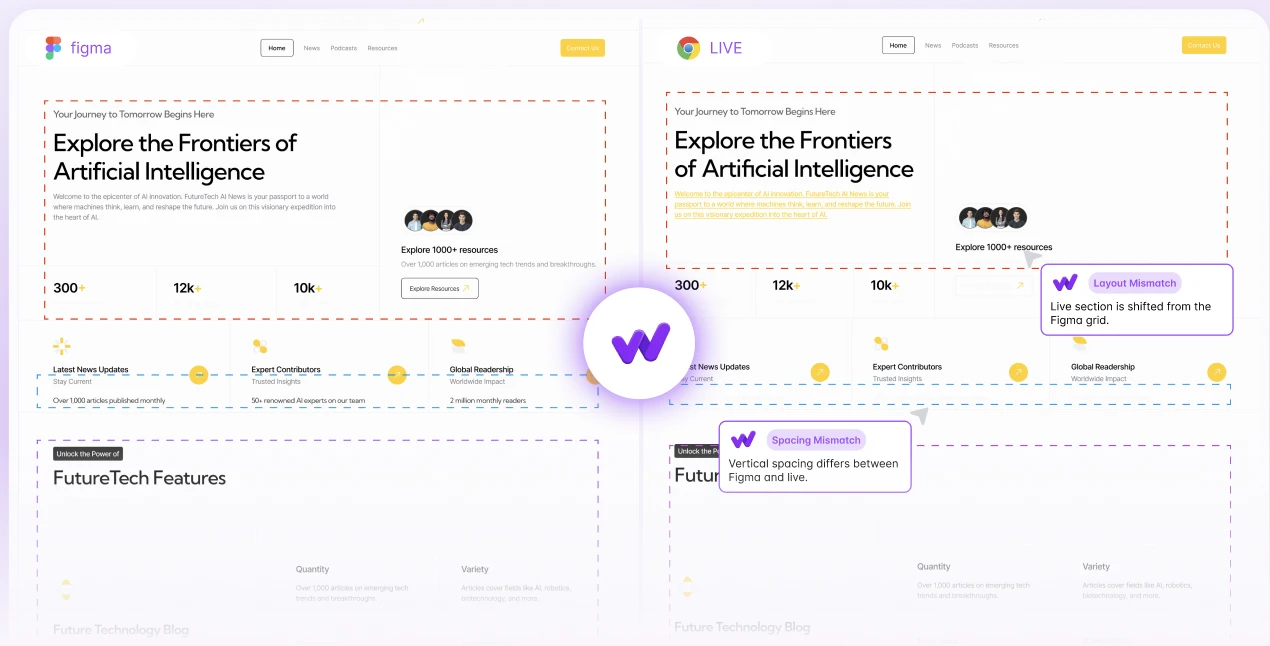
Add your Figma link and website URL. Whoogy compares the design with its live implementation and generates a visual QA report.
Visual testing capabilities
Identify differences between Figma designs and live pages.
Find spacing, positioning, and alignment inconsistencies.
Detect font size, weight, and styling differences.
Catch color, background, and visual styling mismatches.
Identify differences in element sizes and proportions.
Review supported desktop and mobile layouts.
How it works
Paste your Figma link and select the relevant design frames.
Provide the corresponding live website page.
Whoogy compares both and generates a report of visual differences.
Multiple ways to use Whoogy
Compare Figma designs with live websites directly through the browser.
Access supported testing workflows inside Figma.
Use supported Whoogy testing capabilities through Claude.
Visual comparison and reporting
Review your original design alongside the live implementation and inspect detected differences.
Built for design-to-development teams
Verify delivered websites against approved designs.
Catch visual issues before client delivery.
Validate implementations against Figma.
Add visual comparison to QA workflows.
Reduce design-related revisions.
Maintain interface consistency.
Why Whoogy?
It compares a Figma design with its live website implementation to identify visual differences.
Add your Figma link and website URL. Whoogy runs a visual comparison and generates a report.
No. Supported tests can run through the Whoogy Web App without the plugin.
Yes. Whoogy offers a Figma plugin for supported testing workflows.
Yes. Whoogy provides an MCP integration for supported testing capabilities through Claude.
Yes. Whoogy supports multi-page and frame-based testing workflows.
Yes. Supported desktop and mobile visual testing workflows are available.
Whoogy helps identify layout, spacing, alignment, typography, color, and other supported visual differences.
Designers, frontend developers, web agencies, QA engineers, freelancers, and product teams.
Catch visual differences before your clients do. Compare your designs with live websites using Whoogy.
Connect your design. Add your website. Find the differences.