YOUR SITE
ISSUES
AI Website Audit.
No Figma Needed.
AI Website Audit.
No Figma Needed.
Audit any website using just its URL. Detect visual bugs, UI issues, and design inconsistencies with AI-powered website testing.
app.whoogy.com/report
The problem
Your Website Is Live. Is It Ready?
A website can look finished but still have visual, SEO, accessibility, usability, and responsive issues.
Broken layouts
Broken layoutSEO problems
Missing meta descriptionAccessibility and Usability issues
Footer · © 2026Whoogy helps you test your website beyond a simple visual check.
- No manual page-by-page checks.
- No Figma file required.
Product introduction
One URL. Your Entire
Website Audited.
Enter your website URL. Whoogy discovers available pages, runs supported tests, and generates a structured website audit report.
Test My Websiteyourwebsite.comRun audit
Discovered pages
/Found
/pricingFound
/aboutFound
Audit progress68%
Audit capabilities
Everything You Need to
Check Website Quality.
AI Visual Testing
Detect visual inconsistencies, layout issues, and UI defects.
- UI inconsistencies
- Layout and alignment issues
- Visual defects
- Missing or incorrectly displayed elements
Visual findings
Hero · low contrastHigh
Cards · uneven spacingMedium
Footer · text clippedMedium
Nav · misaligned iconLow
Responsive Testing
Find layout issues across supported desktop, tablet, and mobile sizes.
- Desktop responsiveness
- Tablet responsiveness
- Mobile responsiveness
- Layout and element display issues across supported viewports
SEO Audit
Identify SEO issues and optimization opportunities.
- SEO-related page issues
- Missing or problematic page elements
- Search optimization opportunities
Accessibility Testing
Discover potential accessibility barriers.
- Accessibility violations
- Interface accessibility concerns
- Elements that may create barriers for visitors
Usability Analysis
Find navigation, interface, and user experience issues.
- Usability problems
- Interface clarity
- Navigation and interaction concerns
- Potential user experience improvements
Automatic page discovery
Audit Your Entire Website,
Not Just One Page.
Whoogy automatically discovers available website pages and tests them in one workflow.
- Discover website pages automatically.
- Audit multiple pages.
- Review findings across your website.
- Identify pages that need attention.
yourwebsite.com
/Found/pricingFound/aboutFound
82Consolidated results
Issue reporting
Every Issue. Clearly Explained.
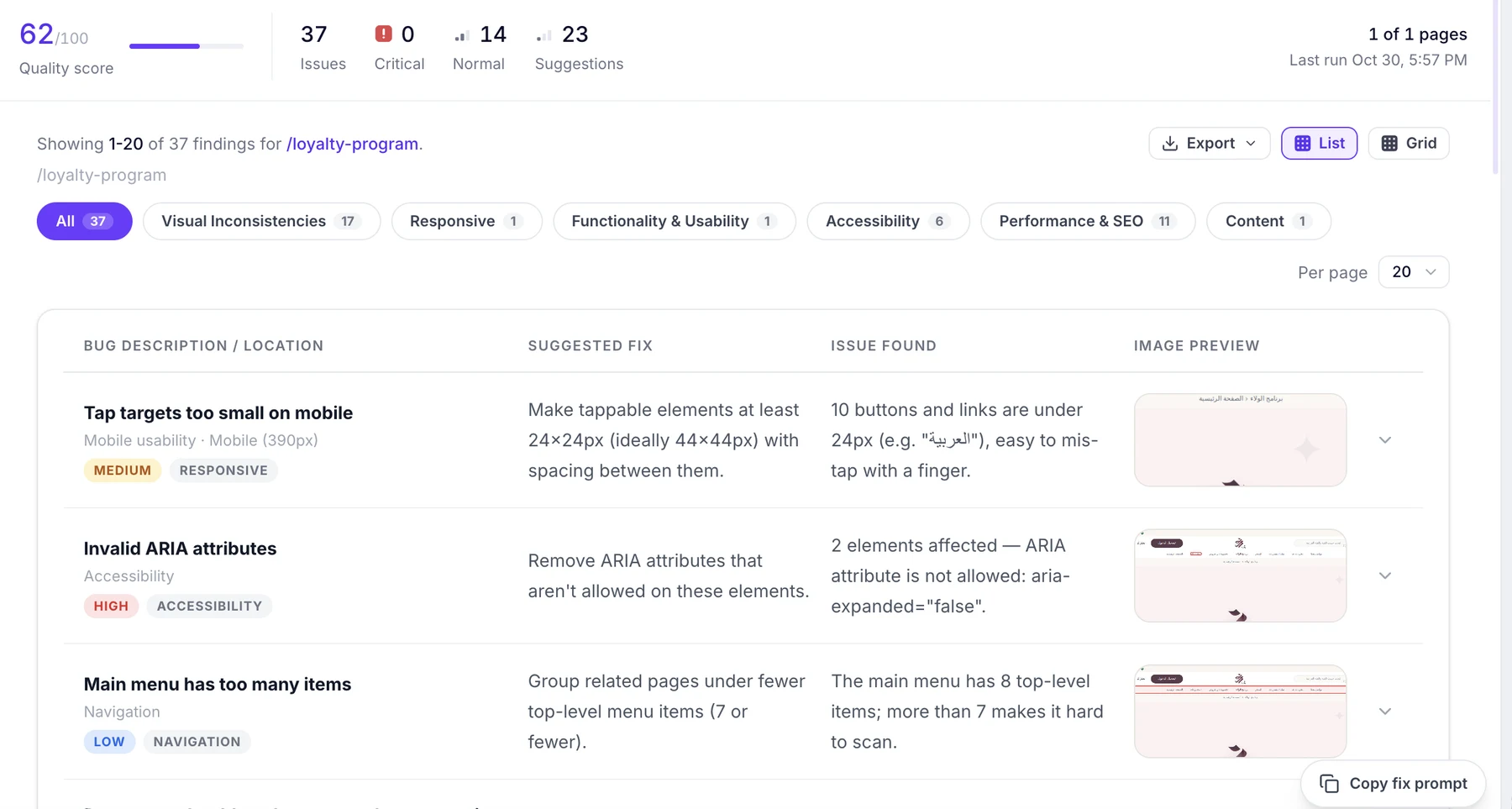
Review detected issues in organized reports with relevant descriptions and visual evidence where available.
app.whoogy.com/report/loyalty-program
137 issues identified2List and grid views3Visual evidence4Issue description and context
MEDIUMRESPONSIVE
Tap targets too small on mobile
10 buttons and links are under 24px, easy to mis-tap with a finger.
Make tappable elements at least 24×24px
Your audit results include
Identified issues and findings
Issue descriptions and relevant context
Visual evidence where available
Organized issue views
A consolidated picture of website quality
AI fix prompts
Find Issues. Get Ready-to-Use Fix Prompts.
Whoogy generates copy-ready AI prompts for detected issues. Use them with your preferred AI coding assistant to help fix your website.
Copy Fix Prompt1Run an audit2Review detected issues3Copy the fix prompt4Apply and verify
PDF
PDF Export
Download audit reports.
CSV
CSV Export
Export findings for analysis.
AI
AI Fix Prompts
Copy prompts for your coding workflow.
List / Grid
List & Grid Views
Review results your way.
Ways to use Whoogy
Test Your Website Your Way.
01
No Plugin Required
Start TestingWhoogy Web App
Audit websites directly using a URL. No plugin required.
02
Figma Plugin
Access supported Figma-to-website testing workflows.
03
Claude MCP
Access supported testing capabilities through Claude.
Who is it for?
Website Auditing for Every Team.
01AI Builders and Vibe Coders
62/10037 issuesLow contrast on hero subtitleHighButton label wraps on mobileMediumMissing alt text on logoMedium
AI Builders and Vibe Coders
Audit AI-generated websites.
02Web Agencies
78/10037 issuesLow contrast on hero subtitleHighButton label wraps on mobileMediumMissing alt text on logoMedium
Web Agencies
Check client websites before delivery.
03Frontend Developers
54/10037 issuesLow contrast on hero subtitleHighButton label wraps on mobileMediumMissing alt text on logoMedium
Frontend Developers
Find visual and responsive issues.
04QA Engineers
71/10037 issuesLow contrast on hero subtitleHighButton label wraps on mobileMediumMissing alt text on logoMedium
QA Engineers
Improve website testing workflows.
05Freelancers
66/10037 issuesLow contrast on hero subtitleHighButton label wraps on mobileMediumMissing alt text on logoMedium
Freelancers
Reduce avoidable revisions.
06SaaS Founders
83/10037 issuesLow contrast on hero subtitleHighButton label wraps on mobileMediumMissing alt text on logoMedium
SaaS Founders
Check website quality before launch.
Why Whoogy?
More Than a Website Audit Tool.
Automatic multi-page discovery
Test pages without entering each URL.
Multiple website quality checks
Visual, SEO, accessibility, usability, responsive.
AI-generated fix prompts
Copy-ready prompts for every issue.
Organized audit reports
Review results in list or grid view.
PDF and CSV exports
Download and share findings.
No Figma file required
Just your website URL.
01What is an AI website audit tool?
It analyzes a live website to identify visual, SEO, accessibility, usability, and responsive issues.
02How does Whoogy work?
Enter your website URL. Whoogy discovers pages, runs supported tests, and generates an audit report.
03Do I need a Figma file?
No. AI Website Audit only requires a live website URL.
04Can Whoogy audit multiple pages?
Yes. Whoogy automatically discovers available pages and tests the pages it identifies.
05Can Whoogy test responsive layouts?
Yes. Whoogy checks supported desktop, tablet, and mobile sizes.
06Does Whoogy suggest fixes?
Yes. It provides copy-ready AI fix prompts for detected issues.
07Can I download audit reports?
Yes. Export results as PDF or CSV.
08Can I audit AI-generated websites?
Yes. Submit the live URL of your AI-generated website.
09Do I need a plugin?
No. Run AI Website Audits directly through the Whoogy web app.
Your Website Is Built. Make Sure It's Ready.
Audit your website, discover issues, and get actionable recommendations.
Enter your URL. Discover issues. Fix faster.
© 2026 Whoogy. All rights reserved.Privacy PolicyTerms